
The Value of Saving Your Work
Creatives who let AI replace their own archive of work risk losing the files that spark imagination.
Why Your Archive of Old Work Matters
I joke with my students whenever it is the beginning of the semester and we are learning something new. If a program does not auto-save, I say, “Why do we save our work?” I get varying answers, but I reply, “Because Jesus saves (He really does).” I get a good laugh because it is the perfect audience for it.
The thing is, though, with some of the amazing AI tools out there that can generate images and designs, I am afraid the act of creation is not valued as much as when it was created by the designer or artist from the beginning. Will the designer keep the file? Will they back it up? Is there any sentiment to it? Will they recall what was going on in their life and reflect back? Maybe, but my research in my study Art Meets Algorithm shows that people do not value AI-generated work in the same way.
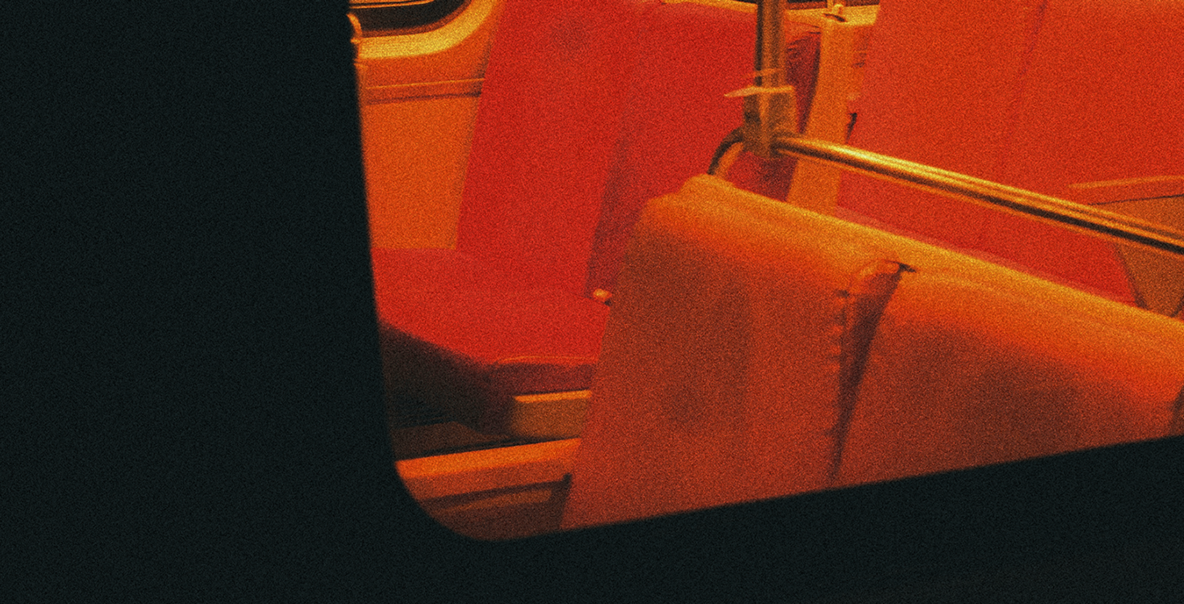
The other day I was backing up some photos. I am always scouring hard drives for something to inspire me or for a sweet photo of my wife and me. I came across this photo of the DC Metro. Outside of the London Underground, the DC Metro is my absolute favorite transit system, with its brutalist and modern build. I snapped this picture, and it was never portfolio-worthy. In my mind, it went into what I call the archive arsenal: a collection of my own images to use toward a future project. When I stumbled across it, it spawned the old cliché that a picture is worth a thousand words. Why?
It was taken over a decade ago. Thirteen years ago, to be exact. That was before kids, before I finished grad school, before my family of origin fractured, and before I lost that sense of Home. We were with friends who are now divorced, names changed, and now strangers. I was a different person, yet the same. Suddenly the train became a metaphor for life stations, for the brutal ways life can change us, and for the choices we make.
How Artists Actually Work
Everyone is obsessed with the end result, but few seem to care about the process that got people to the end, or the draft we all turn in.
In the fascinating book Daily Rituals: How Artists Work by Mason Currey, some of the artists highlighted would stop working when they had a clear direction of where they were going to take their works in progress, leaving off there for the day. I am usually the opposite. When I know where I am taking something, I am like a dog with a bone and will not stop until it is completed.
I am much like caricaturist Al Hirschfeld, of whom it was reported: “Very often, when an assignment is difficult, he can’t fall asleep until the artistic problem is solved, or he dreams about various ways of designing his drawing.”
The book also talks about composer Erik Satie, who would often miss his train home and walk several miles. The repeating street lamps on his way from Paris to Arcueil helped foster the “possibility of variation within repetition.”
More to the point, one of my favorite modern authors, Mick Herron, wrote Slow Horses while commuting from Oxford to London during his career as a sub-editor on legal publications, as detailed in The Guardian’s profile of his commute and routine.
Why do I tell you all this? Because it does not follow a formula. It is your own organic algorithm of your mind.
Using AI Without Giving Up Your Process
With AI, I am afraid prompting does not get us there. That scaffold is not there. Instead, you must rely on just the right prompts. Now, before anyone says differently: you can absolutely use AI and prompting to reach a creative end. Just do not rely on the defaults. Make the AI work for you. Do not just say “build this…” or “design this…” and then expect perfection.
Do not give up on your own work just yet…
The Terminal Boot Sequence
I used a bit of custom jquery in After Effects to add the terminal effect. The music was made with samples in Logic Pro. Below is the Jquery for the terminal script:
var myAge = 41;
var speed = 25;
var loadSpeed = 7;
var cursorSymbol = “█”;
var blinkRate = 3;var pct = Math.min(Math.floor(time * loadSpeed), myAge);
var barLength = 20;
var filled = Math.round((pct / 100) * barLength);
var empty = barLength – filled;
var progressBar = “[” + Array(filled + 1).join(“|”) + Array(empty + 1).join(” “) + “] ” + pct + “%”;
var errorTrigger = (time > 8);
var txt = “BOOT_SEQ: ATOMIC_SKY_v4.0\r” +
“MOUNTING DRIVE: /MINDSTREAM/LENS/\r” +
“SCANNING SECTOR 07-B…\r” +
progressBar + “\r\r” +
(errorTrigger ? “>> CMD: QUIT_RAT_RACE\r” : “”) +
(errorTrigger ? “>> STATUS: SYSTEM_OVERRIDE\r” : “”) +
(errorTrigger ? “…………………………..\r\r” : “”) +
(errorTrigger ? “TO LIVE IS CHRIST\r” : “”) +
(errorTrigger ? “TO DIE IS GAIN\r\r” : “”) +
(errorTrigger ? “…………………………..\r” : “”) +
(errorTrigger ? “LATENCY: 0.00ms // LOCALHOST: 127.0.0.1” : “”);
var charIndex = Math.floor(time * speed);
var cursor = (Math.floor(time * blinkRate) % 2 == 0) ? cursorSymbol : “”;
txt.substring(0, charIndex) + cursor;
Here is the final piece! I hope you enjoy.
Final Deliverable
Creative Stack
- Adobe Lightroom (Image Editing)
- Adobe After Effects (Terminal Boot Sequence, Rotating Type Sphere and VFX)
- Apple Logic Pro (Music Created from Samples)